2.2 Context Engineering#
Section 2.1's prompt fixed two of the four client replies. The other two, the raw vendor numbers and "And NVIDIA?", were never prompt problems. Decide what the model reads on each call, and have code put it there. This section is taught in the same session as section 2.1. The session 2 lecture recording and slides are on the chapter 2 page.
▶ Open in ColabLearning objectives
Say what the context is on one call, and how context engineering differs from writing a prompt.
Assemble the context for one call from instructions, a client card, a retrieved policy clause and the last exchange.
Count what each piece costs, and decide what belongs in the prompt, in the context per call, and in a code check after the answer.
Hand an independent job to a sub-agent with a clean desk, and say what that saves and what it costs.
2.2.1 From prompts to context#
Section 2.1 ended on a list of what a prompt cannot do. It costs every call, it cannot hold facts, it cannot hold what changes, and a long one gets ignored in the middle. The two replies it did not fix need exactly those things: a policy clause the prompt never mentioned, and the memo from two hours ago.
The context is everything the model reads on one call. In the loop from chapter 1 that is the messages list: the system prompt, any earlier turns, the tool results so far, and the question. Context engineering is deciding what goes in that list, in what order, at what cost, for every call, and having code do it rather than a person.
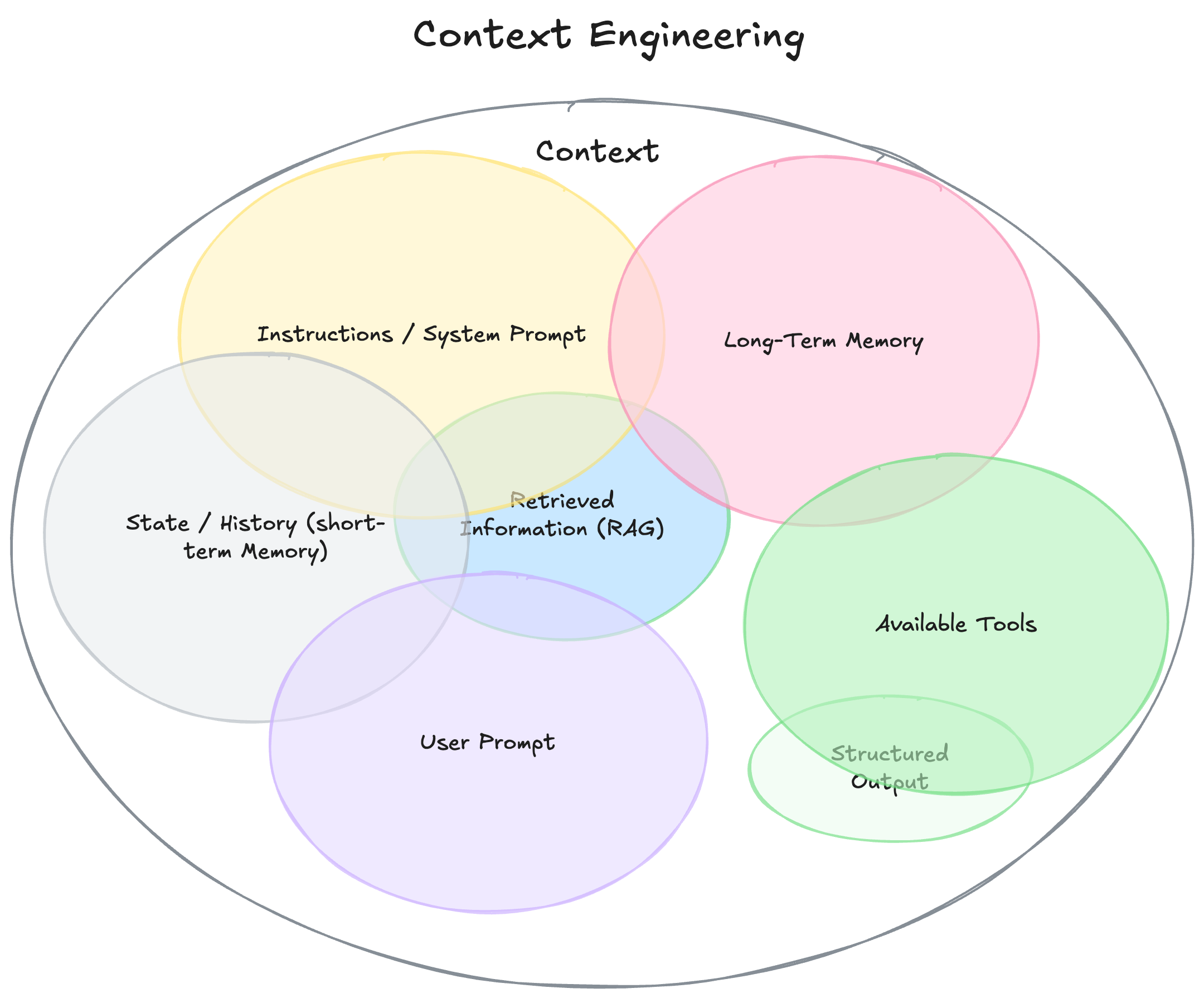
Fig. 3 What goes into the context on one call. The pieces overlap: a retrieved clause can sit in the system prompt, and a remembered fact can come back as retrieved text.#
Anthropic’s engineering team put it as the shift from finding the right words to finding the right configuration of context, and Andrej Karpathy called it the delicate art of filling the window with just the right information for the next step. The picture this book uses is the analyst’s desk. There is a fixed amount of room on it. Before each call, something has to decide what is on the desk and what stays in the filing cabinet.
Tick paste the whole handbook, then swap it for retrieve the one clause. Same rule, same model: 6,000 tokens that push the question off the desk, or 30 that arrive only when they matter.
Prompt engineering picks the words in one block. Context engineering picks the blocks. The prompt did not go away; it became the first block, and usually the smallest.
2.2.2 Context engineering at the firm#
Three client replies, three different desks. The only new code is build_context, which decides what comes out of the filing cabinet for each call. Pick a reply and read why each card is where it is:
Now run each desk for real.
The follow-up, with and without the memo on the desk:
from agent import agent

first = "Compare Deere's revenue growth with Caterpillar's last quarter"
memo, log = agent(first, verbose=False)

print("Without the last exchange on the desk:")
agent("And NVIDIA?")

print("\nWith it:")
agent("And NVIDIA?", history=[("user", first), ("assistant", memo)])
One lookup instead of three. The history tells the model what the question means, and it carries figures the model would otherwise fetch again. That is also why it is expensive, and why build_context keeps only the last exchange.
The vendor-data clause, retrieved for this question only:
from agent import agent
from context import build_context, describe_context

q = "And the raw vendor numbers behind that?"
system, history = build_context(q, client="meridian", history=[("user", first), ("assistant", memo)])

print("On the desk for this call:")
describe_context(system, history, q)
print()
answer, log = agent(q, system=system, history=history)
The memo declines and cites data-licensing-1. Chapter 3 is about making that retrieval step reliable: how the handbook is chunked, how the search finds the right clause, and what to do when it finds the wrong one.
The client card, with no history and no clause:
from agent import agent
from context import build_context

q = "What was Deere's revenue growth last quarter?"
system, history = build_context(q, client="meridian")
answer, log = agent(q, system=system)
A table, though nobody asked for one. That preference is held in the client’s record, and code puts it on the desk.
Where does each thing live? Sort what the firm needs the model to know:
Checkpoint.
Compliance updates the restricted list every Monday. The agent must never draft a note that recommends a restricted name. Where should the list live?
2.2.3 Sub-agents: a clean desk for each job#
A four-company comparison means four lookups. When one agent makes them all, every result stays on its desk, and each later call reads everything before it. By the time it writes four sentences, most of what it reads is raw material it no longer needs.
A sub-agent is an agent that the lead agent sends off to do one job. It starts with a clean desk: only its task. It does the lookup, sends back one line, and its desk is thrown away. The lead never sees the working papers. Priya does the same when she asks Marcus for Deere’s number: she gets one line back, not his spreadsheet.
Step through both set-ups. Each lookup here returns a filing extract of about 1,800 tokens, the size of a real one:
The same pattern with the book’s agent. sub_agent runs the chapter 1 loop with nothing on its desk but one company’s question:
from agent import agent
from context import ROLE, RULES, estimate_tokens

COMPANIES = ["Deere", "Caterpillar", "NVIDIA", "Microsoft"]

def sub_agent(company):
    """A fresh agent with a clean desk: one company in, one line back."""
    answer, log = agent(f"What was {company}'s revenue growth last quarter?", verbose=False)
    return answer

notes = [sub_agent(c) for c in COMPANIES]
for note in notes:
    print("note from a sub-agent:", note)

# What the lead reads when it writes the memo, against one agent that did every lookup itself.
q = "Compare revenue growth for Deere, Caterpillar, NVIDIA and Microsoft last quarter"
answer, log = agent(q, system=ROLE + "\n\n" + RULES, verbose=False)
desk = estimate_tokens(ROLE + RULES + q)
results = [estimate_tokens(str(e["result"])) for e in log if e["kind"] == "tool_call"]
print()
print(f"lead with sub-agents reads {desk + sum(estimate_tokens(n) for n in notes):>6} tokens")
print(f"one agent reads            {desk + sum(results):>6} tokens   (the book's records are tiny)")
print(f"one agent, real filings    {desk + 1800 * len(results):>6} tokens   (about 1,800 per lookup)")
The book’s records are a dozen tokens each, so on them the saving is small. Real lookups return pages, and that is where a sub-agent earns its keep.
What it costs. More model calls: in the widget, nine instead of five. A sub-agent sees none of the lead’s desk, not the client card, not the rules, not the earlier turns, unless code hands them over, so choosing what to pass down is context engineering again. And a one-line note can drop a detail the lead turns out to need. Sub-agents are worth it when the pieces are independent and each one reads a lot; chapter 6 runs many agents at once.
2.2.4 Run it against a real model#
The mock uses whatever is on the desk because it was written to. A real model usually does, and it can also ignore a clause or misread a follow-up. The cells below send the same desks to the GPT deployment on Illinois Azure through this site’s /api/chat proxy; your browser never sees a key.
First, the follow-up. Write the memo, then ask “And NVIDIA?” with and without the last exchange:
from agent import agent
from llm import azure_model
from context import build_context

first = "Compare Deere's revenue growth with Caterpillar's last quarter"
system, _ = build_context(first, client="meridian")
memo, log = agent(first, model=azure_model, system=system, verbose=False)

print("Without the last exchange:")
answer, log = agent("And NVIDIA?", model=azure_model, system=system)
print("\nWith it:")
answer, log = agent("And NVIDIA?", model=azure_model, system=system,
                    history=[("user", first), ("assistant", memo)])
Count the lookups in the second run. The mock made one, because it reused the two figures from the memo. A real model may look all three up again. Both answers are correct; one costs more.
Second, the retrieved clause. The same vendor-data question, with the clause on the desk:
from agent import agent
from llm import azure_model
from context import build_context

q = "And the raw vendor numbers behind that?"
system, history = build_context(q, client="meridian", history=[("user", first), ("assistant", memo)])
answer, log = agent(q, model=azure_model, system=system, history=history)
Did it decline? Did it cite data-licensing-1, or just refuse? Then check the client card: was the first memo a table, even though nobody asked for one?
2.2.5 Exercise#
Open the Colab notebook. It has the chapter 1 loop rewritten with LangChain (a ChatPromptTemplate lays out the desk), with system and history arguments, the prompt blocks from section 2.1, and build_context, all wired to glm-5.3-flash on Lumen (see Setup for the key).
build_contextretrieves a handbook clause when the question mentions vendor data or policy. Add the trigger for expense questions, then ask “Can I expense a $70 dinner on the Chicago trip?” and check that the memo citesexpense-2.Run the three-company comparison and print the token count on the desk at each call. Then change
build_contextso that after the memo is written, the history it returns is a one-sentence summary of the exchange instead of the full memo. How many tokens did the next follow-up save?In three sentences: one thing you would put in the prompt, one thing you would retrieve into the context per call, and one thing you would enforce in code after the model answers, with a reason for each.
Further reading#
Anthropic, Effective context engineering for AI agents (2025) — the shift from prompt to context, and the “smallest set of high-signal tokens” principle this chapter’s desk picture is drawn from.
Andrej Karpathy, the post that named “context engineering” (2025) — the phrase, and the argument that the prompt is the small part.